How to automate client follow-up in SMEs? 2026 practical guide
In an SME, client follow-up often falls to just one person, the manager, the accountant, or someone in sales administration who is already juggling ten other tasks. The result: reminders go out when someone remembers, sometimes too late, sometimes not at all.
This isn’t a motivation problem. It’s a structural one. And that’s precisely what automation solves, without turning client relationships into an impersonal message factory.
Why manual client follow-up no longer works in SMEs
Time is simply lacking
Following up with a client means checking the due date, finding the invoice, drafting an appropriate message, scheduling or sending it, then noting that it’s been done. Multiplied by ten, twenty, fifty clients, this quickly becomes unmanageable, especially when this task is nobody’s priority.
Oversights are the norm
Without a system, follow-up depends on someone’s memory or availability. A busy period, an absence, a client “we know well so we won’t chase them just yet”, and the invoice slips by a few days, then a few weeks.
Tone and consistency vary depending on who handles it
A follow-up sent at D+15 by an overstretched manager doesn’t carry the same weight as one sent systematically at D+3. Without a framework, every client follow-up depends on whoever is available at that moment. This sends a signal of inconsistency, which clients quickly factor into their payment behaviour.
Automate your reminders while staying close to your clients.
Automated reminder schedules, personalized messages, centralized tracking: CashNow structures your debt collection without making it impersonal.
In average, automation can halve the weekly time spent tracking invoices. For a small team, that’s the equivalent of several hours freed up each week for higher-value tasks.
The benefits of automating client follow-up
Automating follow-up doesn’t mean replacing people with generic mass emails. It means structuring what needs to be systematic, to free up time for what requires genuine interaction.
A follow-up schedule that runs itself
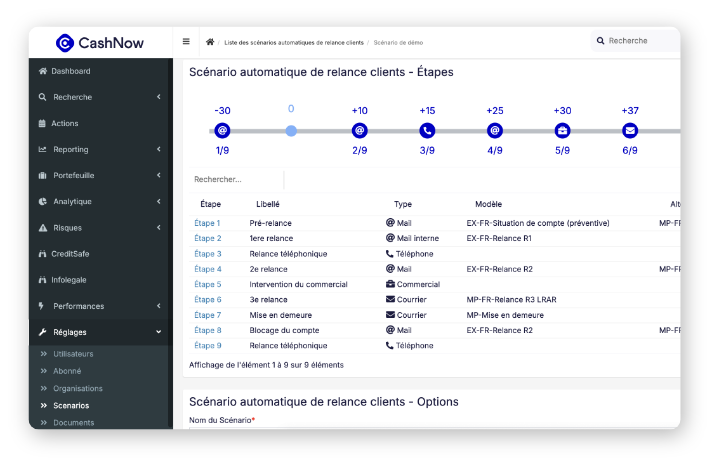
Once the rules are defined, for example, a preventive payment reminder before the due date, then follow-ups at D+3, D+10, D+20, the system sends messages at the right time, without anyone having to remember. The process becomes systematic, where previously it depended on someone’s availability.
Also worth reading: Client follow-up: 10 mistakes that delay your payments
Personalised client reminders
Automation doesn’t mean uniformity. Messages can include the contact’s name, invoice number, amount, and due date, and the tone can evolve from one stage to the next, from a courteous reminder to a firmer follow-up. Personalisation is automated.
A combination of channels
Email alone is easy to ignore, especially in a crowded inbox. Being able to combine email, SMS, and phone calls at the right moments significantly increases the chances of getting a response, without demanding more time from the team, since the system manages the cadence.
A clear view of who owes what, and since when
Beyond sending reminders, automation centralises information: who has been contacted, when, and with what outcome. No more parallel Excel files or scattered notes, the entire history is in one place.
Also worth reading: DSO: 5 concrete levers to improve your payment terms
The impact of automation on your SME’s cash flow
For an SME managing its collections manually, the benefits of automating client follow-up show across several areas:
- Less time wasted on repetitive, low-value tasks that don’t contribute anything in themselves.
- Fewer forgotten invoices: every unpaid invoice enters a workflow. No more relying on someone’s memory.
- More predictable cash flow: when follow-ups are systematic and prompt, money comes in more regularly, making day-to-day cash management easier.
- A preserved or even improved client relationship: a client chased at the right moment, with the right tone and all the necessary information (invoice, amount, due date), sees this as professionalism rather than pressure.
How to set up automated client follow-up in a small team
There’s no need to automate everything at once. The most natural progression:
- Start with a simple schedule: a reminder before the due date, a follow-up at D+5, another at D+15.
- Centralise information: invoices, due dates, contacts — all in one place.
- Add channels progressively: email first, then SMS or phone calls where they’re warranted.
- Keep a human eye on special cases: a major client, a sensitive situation, an ongoing dispute — these always warrant a manual approach, even within an automated system.
CashNow supports exactly this kind of progression: automating what needs to be automated, while keeping full control over situations that call for a tailored approach.
Want to see how to automate your reminders while staying close to your clients?
Contact CashNow today.
CashNow, a debt collection software built for SMEs
CashNow is a complete debt collection software solution: automated and customisable client reminders, dispute management, DSO monitoring, and credit risk management. Built for teams that want to professionalise their collections without outsourcing them.
Contact CashNow for a demo!
FAQ – Automating client follow-up in SMEs
Does automating follow-ups make communication impersonal?
Not if it’s properly configured. Automated reminders can include the contact’s name, invoice details, and a tone that evolves from one stage to the next, from a courteous reminder to a firmer follow-up. Automation structures the schedule; it doesn’t replace message personalisation.
How long does it take to set up an automated follow-up system?
A simple workflow (reminder before due date, follow-ups at regular intervals) can be set up quickly, within a few days. A full implementation, including accounting data integration and fine-tuned personalisation, typically takes a few weeks depending on the complexity of the existing setup.
Does a small SME really need follow-up software?
As soon as an SME is managing several hundred invoices simultaneously, manual tracking becomes a mental burden and a risk of oversight. Follow-up software isn’t just for large organisations, it’s often in small teams, where one person handles everything, that it makes the biggest difference.
What’s the difference between follow-up software and a manual reminder in a calendar?
A calendar reminder tells you it’s time to follow up, but the follow-up itself remains manual: find the invoice, draft the message, send it. Follow-up software automates the entire process, from trigger to delivery, while maintaining a structured history of every interaction.
Written by:

Charles Plasse
Co-founder and Managing Partner of CashNow
Charles Plasse is the co-founder and Managing Partner of CashNow, a FinTech company specializing in accounts receivable management and debt collection. Before founding CashNow in 2013, he worked for several years as a Cash & Working Capital consultant for leading firms, including EY, Deloitte, and Eight Advisory, assisting large corporations. Today, he helps SMEs and mid-sized companies optimize their DSO and structure their collection processes.